Top AI WordPress Plugins in 2026
A practical guide to this year’s AI plugins worth adding—what they do, how much they cost, and who they’re for
If you manage a WordPress site in 2026, you’ve probably seen that nearly every plugin seller is selling some “AI” function. Some of it is indeed helpful. Some of it is merely a thin veneer over a chat bot. This article examines the best AI plugins for WordPress, focusing on four key tasks: content generation, SEO enhancement, page design, and customer care.
Whether you’re a blogger, a WooCommerce store owner, or an agency managing dozens of client sites, the appropriate AI plugins can save you hours every week. The wrong ones will slow down your site, increase your bills, and fill your pages with generic material. Let us help you choose the correct ones.
Table of Contents
Best AI Plugins for WordPress 2026
Quick Answer: The finest AI plugins for WordPress in 2026 will rely on the task you want to accomplish. The short version is:
• Best all-rounder: AI Engine, for chatbots, content, and developer freedom.
• Best for AI-assisted SEO: Rank Math (Content AI) or Yoast SEO Premium, if you’re already a Yoast user.
• Best for block editor writing: Jetpack AI Assistant.
• Best for content writers and SEO: GetGenie AI
• Best for design: Elementor AI or Divi AI, whichever page builder you use.
• Best for customer support: Tidio.
One plugin at a time and test it on a staging site. Always check the AI output before publishing.
Why AI Plugins Will Be Important for WordPress in 2026
WordPress still powers about 43% of all websites, according to multiple industry roundups this year. Automation naturally fits at that size. Recently, three factors have changed to make AI plugins more relevant than ever:
1. WordPress-Friendly AI: We added the Abilities API in WordPress 6.9. In WordPress 7.0 (due May 20, 2026), we implemented an AI Connectors screen and an AI Client library. Now you can connect to an AI provider once in plain English, and compatible plugins can share that connection, instead of having to paste API keys into five different settings pages.
2. Integrated solutions are better than standalone tools: The finest AI plugins work inside your block editor or page builder, not a separate dashboard you have to remember to open.
3. Better quality, not more quantity: Search engines haven’t outlawed AI-assisted material, but they do reward truly beneficial pages. Publishing thin, unedited pages with AI plugins is the fastest method to lose rankings.
The message is to regard AI plugins as accelerators for a human editor, not replacements for one.
How to Select the Best AI Plugins
Before you install anything, be sure that:
• Your primary goal: Problems of a somewhat different sort. SEO, content, design, and support. Very few do all four of them well.
• Editor integration: Does it work with your page builder or Gutenberg?
• Pricing model: Subscription, one-off price, or pay per use with your own API key?
• Performance: Heavy plugins slow down admin screens and front-end load times.
• Privacy of data: “Be careful what you send to third-party AI providers, especially membership or healthcare or client site content.”
• Maintenance: View update history, number of active installations, and support responses at WordPress.
Best AI Plugins for WordPress
1. AI Engine: Best All-Round Plugin for Bots, Content & Developers
AI Engine is one of the most adaptable AI plugins in the WordPress source. It allows you to design chatbots, content, and graphics and connect to many AI providers all in one. Developers like its hooks, its API-style flexibility, and its support for newer connection standards. The free version gives you the interface, while pricier editions add vector databases, automation, and fine tweaking.
Best for: Developers, agencies, and power users who want a single customized toolset.
Warning: Many settings are exposed that can be scary for novices.
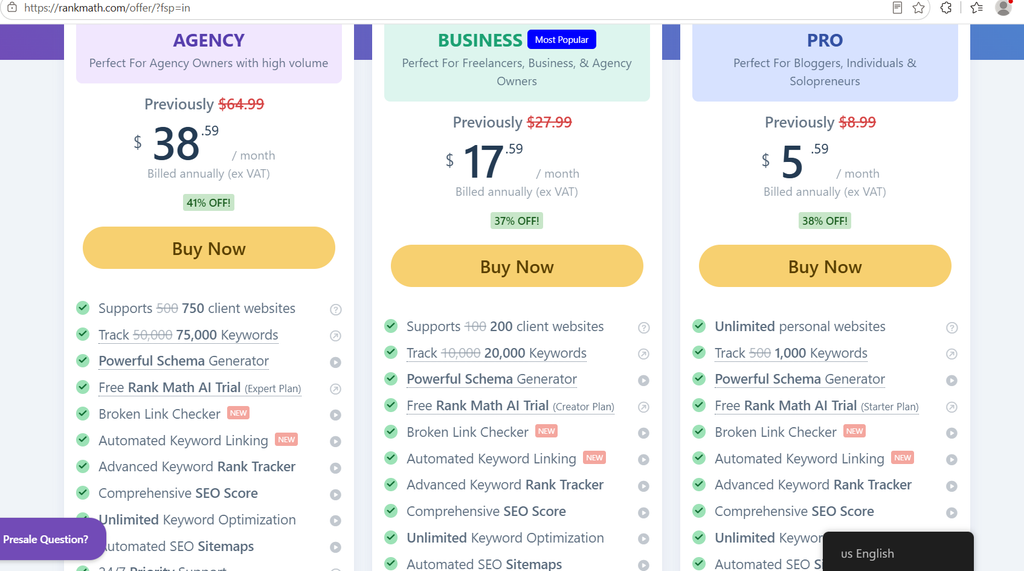
2. Rank Math (Content AI): Best AI SEO
Rank Math delivers AI directly into your SEO process, with keyword suggestions, content rating, title & description ideas, and FAQ schema support. The AI is right there with your on-page checks so you can write, grade, and adjust all on one screen.
Best for: Bloggers and content teams who want SEO and AI in one plugin.
Warning: Paid plans have a credit system for AI usage; therefore, heavy users should check the restrictions.
3. Yoast SEO Premium (With AI capabilities): Best For Sites That Already Use Yoast
If you’re currently using Yoast on your site, you might as well stick with the same plugin instead of switching, as it also comes with AI-powered title and meta description generation. According to a compilation in 2026, Yoast SEO Premium costs around $118.80 per year per site (nearly $9.90 per month invoiced annually, excluding VAT). Prices are subject to change; see vendor page.
Best for: existing Yoast users who want quick metadata generation. Warning: the AI features are more focused than all-in-one writing tools.
4. Jetpack AI Assistant: Best for Speedy Writing in the Block Editor Jetpack AI Assistant is integrated into the block editor, so you can write, rewrite, change the tone, correct language, and summarize without leaving your post. The tool is very useful for WooCommerce stores which need a lot of SEO friendly product descriptions. Best for: Bloggers and small stores seeking a straightforward, low-friction AI writing assistant. Warning: Be aware of the lower tier usage limits and the need to adjust the output to fit your brand voice
5. Get Genie AI: Best for SEO Content Writing
Get Genie mixes long-form content, competitor analysis, and keyword research. It’s for authors who want a means to progress from outline to draft with built-in SEO help.
Best for: affiliate sites, niche bloggers, and content marketers.
Warning: drafts still require verification and a human touch.
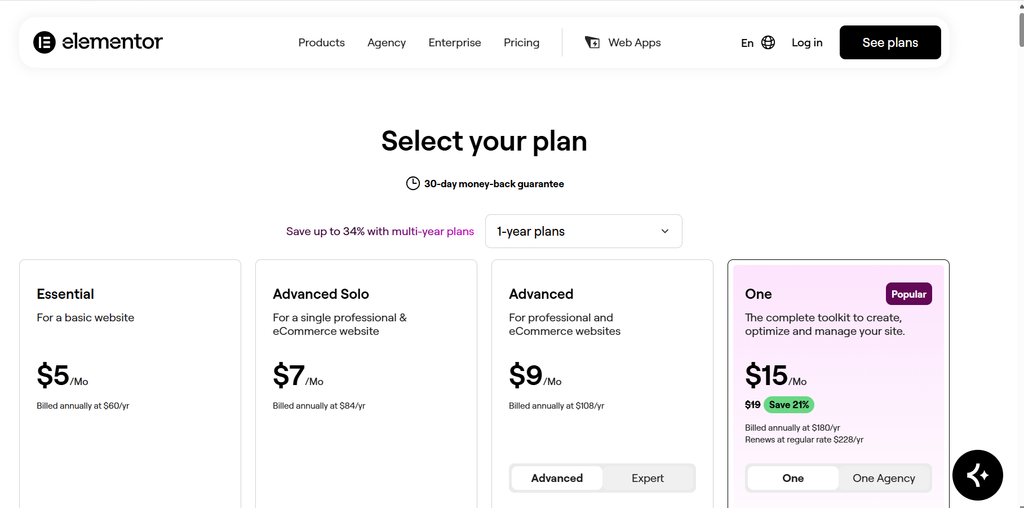
6. Elementor: AI Best Visual Design & Layouts Elementor With AI you can create text, graphics, custom CSS and even layout suggestions directly in the Elementor builder. If you are already building with Elementor, then no need to switch between tools. Best for: Elementor users (site builders and designers)
Warning: This only works if you are using Elementor as your builder.
7. Divi AI: Best for Divi Users Divi AI brings the same benefits to the Divi ecosystem: generating text, graphics, and page elements from prompts directly within the builder. Best for: Agencies and freelancers working with Divi. The value depends on what constructor you use like Elementor. Best For: Yoast users in need of quick metadata generation. Warning: AI features are more of a niche compared to all-in-one authoring tools.
8. Tidio: Best AI Chatbot for Customer Support
Tidio provides live chat and an AI assistant to answer common queries, qualify leads, and assist shoppers 24/7. “It’s excellent for retail stores and service businesses that want to improve their response times without hiring more people.
Best for: Small companies and WooCommerce sites.
Warning: monthly price that increases with the number of talks, so keep an eye on your usage.
Quick Comparison Table of the Best AI Plugins
| Plugin | Best for | Core AI use | Pricing Model | Difficulty |
| AI Engine | Developers and power users | Chatbots, content, images | Free plus paid tiers | Medium to high |
| Rank Math (Content AI) | Bloggers and SEO teams | SEO writing and scoring | Free plus paid, credit-based AI | Medium |
| Yoast SEO Premium | Existing Yoast users | Titles and meta descriptions | Annual subscription | Easy |
| Jetpack AI Assistant | Block editor writing | Drafting and rewriting | Tiered plans | Easy |
| GetGenie AI | AI SEO content writers | Keyword research and drafts | Free plus paid | Medium |
| Elementor AI | Elementor designers | Text, images, layouts | Add-on subscription | Easy |
| Divi AI | Divi users | Copy, images, sections | Add-on subscription | Easy |
| Tidio | Customer support | AI chatbot and live chat | Free plus usage-based paid | Easy |
AI Plugins in WordPress: The Future
The direction is obvious. WordPress 7.0’s AI Client and AI Connectors screens are steps toward a common AI layer that plugins can build upon. Expect more plugins that allow AI assistants to take actions on your site, like updating metadata or managing products, rather than just creating text. Also, there will be more price competition because built-in features reduce the need for separate subscriptions. Site owners who can learn to use these tools with good editorial judgment will have a real edge.
What are the best AI plugins for WordPress in 2026?
It is contingent upon what you want to do . The best choice . AI Engine is great for flexibility, Rank Math and Yoast are great for SEO, Jetpack AI Assistant is great for writing in the block editor, Elementor AI and Divi AI are great for design, and Tidio is great for customer support.
Are AI plugins for WordPress free?
Many have a free tier with limited features or usage. Paid plans usually have higher limits, automation, knowledge-base training and support. Some require you to pay an AI provider directly, through your own API key.
Will AI plugins slow down my WordPress site?
Less is better. You’ll normally only need one plugin for writing, SEO and support each. More plugins means more cost, more conflicts, more maintenance.
Conclusion:
The best WordPress AI plugins in 2026 are those that get a specific job done in your workflow. Select one for writing and one for SEO. Use a chatbot or design tool only if you really need to. Test everything on staging, have a human in the loop and check on your outcomes after a month. And with the right setup, AI plugins can save you hours a week, all while keeping your material trustworthy.
References:
WordPress Plugins | WordPress.org

I am Sirisha, and I am a digital marketing professional and content creator interested in Artificial Intelligence (AI), digital marketing, websites, apps, software, and technology. I also have completed digital marketing training from ODMT, where I have learned about Search Engine Optimization (SEO), Google Ads, Meta Ads, and web designing. My learning and hands-on experience is building on my knowledge of digital marketing, AI tools, and online technologies.
I’m the founder and content creator of TVSM Blogs, and I’m here to share useful, informative, and beginner-friendly content about AI tools, digital marketing, software applications, website development, blogging, and emerging technology trends. I want to help people understand new digital devices and how to use them effectively in their personal and professional activities. I am particularly keen to investigate AI-powered tools like ChatGPT, Gemini, Claude, Perplexity, and other productivity tools that can help with content creation, marketing, research, and everyday tasks.
I will be writing about practical AI tutorials, digital marketing guides, app reviews, software comparisons, website tutorials, and tech articles on my blog. I believe in continuous learning, research for reliable information, and sharing knowledge in a simple and easy-to-understand language. I want to review some tools, share my practical experience with them, and explain their features, benefits, and limitations so that readers can make informed decisions.