Quick Answer: To make speech with Eleven Labs, log into Eleven labs (you may use a free account to experiment around with), go to Text to Speech and paste your script in. Select a voice from the drop-down or the Voice Library, pick a model (multilingual for most content, faster for short drafts) and adjust stability, similarity and style to your satisfaction. Click Generate, listen, edit the text or settings if you want, then download the MP3. Tip: punctuation changes delivery so tweaking commas and periods often helps more than changing settings. Free plans have limits on characters per month so keep test scripts short and check the price page for current details.
Table of Contents
Introduction
If you’re recording your own voice, editing the audio, removing background noise, and having to re-record when you make changes, a natural-sounding voiceover can take a lot of time. AI voice-generation tools like Eleven labs make the process much easier.
11 Labs (also called Eleven Labs) is an AI voice platform that can turn written text into natural-sounding speech. Provides different voices and features for creating voiceovers, narration, videos, podcasts, advertisements, and other audio content.
If you are a beginner and want to learn how to generate voice in Eleven Labs, this tutorial will help you walk through the process.
What Is 11 Labs?
11 Labs (officially ElevenLabs) is an AI voice-generation service that offers text-to-speech and other audio tools. You can type in text, choose a suitable AI voice, adjust available settings, and generate spoken audio.
ElevenLabs has a large voice library, with options like voice cloning and voice design. The documentation currently states text-to-speech is a way to convert text to natural-sounding speech.
The easiest way to begin for beginners is the Text to Speech feature.
Why Use Eleven Labs for Voice Generation?
There are a lot of reasons why a content creator might want to use AI voice-generation technologies such as Eleven Labs.
1. Create voiceovers quickly
Instead of recording your voice, you can type/paste your script and get audio.
2. Change the voices
Play around with different voices. Pick a voice from the Voice Library and test out a few to see which one works best for your topic and style.
3. Create content in multiple languages
Eleven Labs has text-to-speech models in a number of languages, which might be valuable for authors producing material for varied audiences.
4. Eleven labs make great voiceovers for videos and social media
AI voiceovers are great for YouTube videos, short-form content, education, advertisements, presentations and a lot of other uses.
You can test different voices and scripts before deciding to get final audio.
How to Generate Voice in Eleven Labs?
Now let’s look at the process step by step.
Step 1: Create an 11 Labs Account
First, visit the official ElevenLabs website and create an account.
You can start with the available free option. ElevenLabs currently states that its free tier includes a monthly character allowance and access to Text to Speech and other features, although limits and features can change over time.
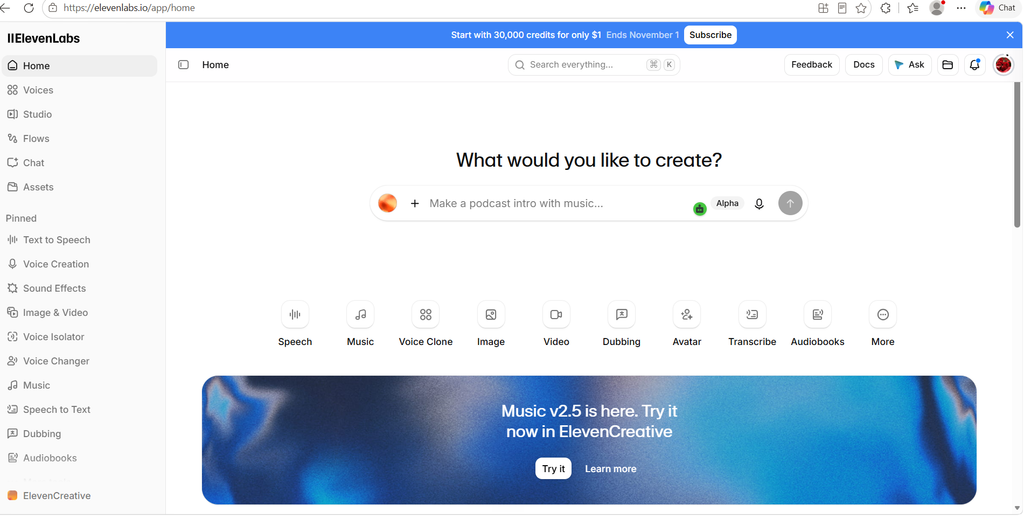
After creating and verifying your account, open the ElevenLabs application.
Step 2: Open Text to Speech
After logging in, look for the Text to Speech option.
Text to Speech is the feature that converts your written script into spoken audio.
According to the official documentation, the basic process is:
- Enter your text.
- Select a voice.
- Adjust settings if required.
- Generate the audio.
Step 3: Enter Your Script
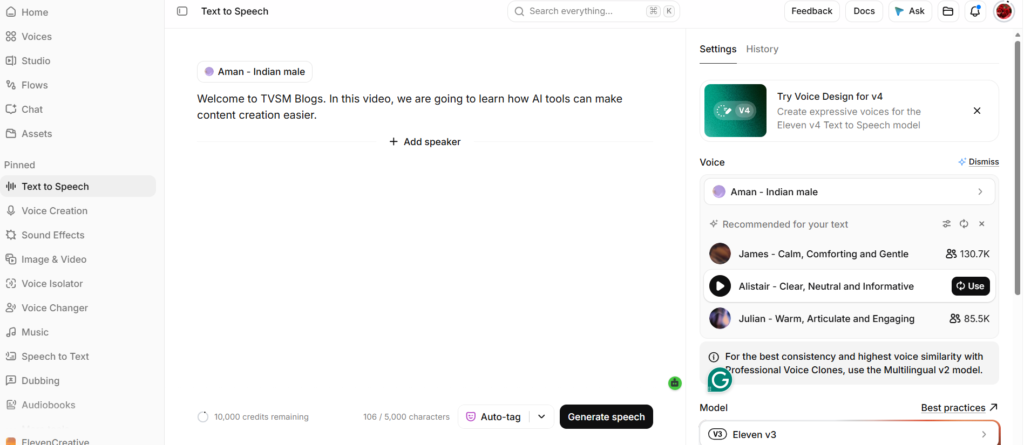
Enter or paste the text that you want the AI voice to speak.
For example, if you are creating a YouTube introduction, you could use: “Welcome to TVSM Blogs. In this video, we are going to learn how AI tools can make content creation easier.”
Before generating the audio, read through your script once.
Check for:
- Spelling mistakes
- Incorrect punctuation
- Unnecessary spaces
- Long sentences
- Incorrect names
- Numbers and abbreviations
Punctuation can also affect how the generated voice sounds, so writing your script clearly can help produce more natural speech.
Step 4: Select a Voice
The next step is selecting an AI voice.
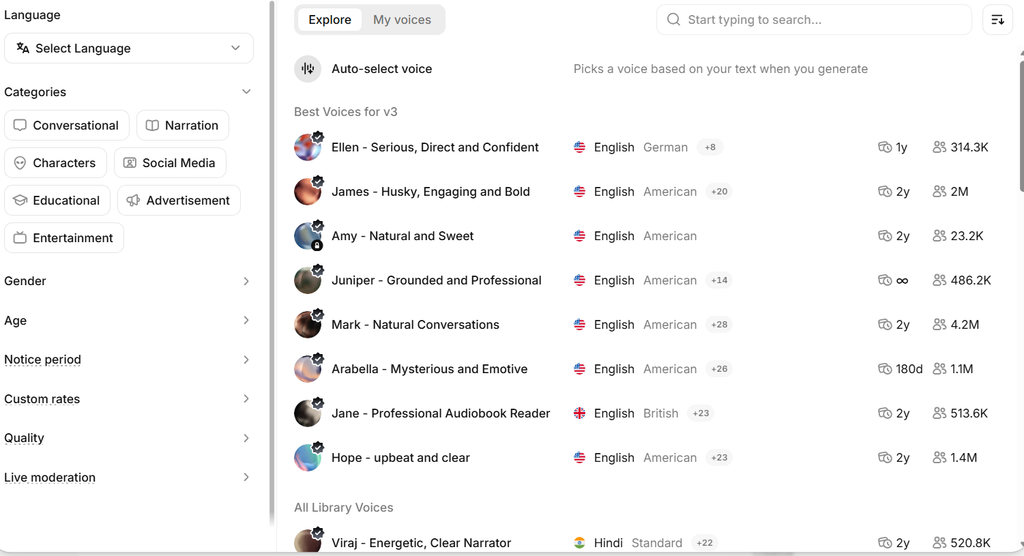
ElevenLabs provides a Voice Library where you can explore voices based on different characteristics and use cases. The current platform provides thousands of voices, while its documentation describes community, cloned, and Voice Design options.
When choosing a voice, consider:
- Male or female voice
- Age
- Accent
- Speaking style
- Tone
- Narration style
- Intended audience
- Type of content
For example, an educational video may need a clear and professional voice, while a social media video may work better with a conversational voice.
Step 5: Adjust the Voice Settings
Depending on the model and interface you are using, you may have different voice settings available.
These settings can affect characteristics such as consistency, similarity, style, or delivery.
Do not change every setting immediately if you are a beginner. Start with the default settings and generate a sample.
Listen to the result and make small adjustments if necessary.
Step 6: Generate the Voice
After entering your script and selecting your voice, click the Generate button.
Eleven Labs will process your text and create the voice audio.
The official Text to Speech guide describes this as the final step after entering the text, selecting a voice, and optionally adjusting settings.
Listen carefully to the generated audio.
Check whether:
- The pronunciation is correct.
- The voice sounds natural.
- The speed is comfortable.
- The pauses sound appropriate.
- Names and technical words are pronounced correctly.
- The emotion matches your content.
If you are not satisfied, edit your script or settings and generate another version.
Step 7: Download the Audio
Once you are happy with the result, you can download the generated audio and use it in your project.
ElevenLabs supports common audio formats including MP3, while other formats are available depending on the product, model, and plan.
You can then import the audio into video-editing software such as your preferred editor and synchronize it with your video.
Tips to Enhance Voice Quality in 11 Labs
Creating an AI voice is quite easy, but the quality of your script might be the game-changer.
1. Write statements in the most natural way possible
I have been listening to this album for a while now.
Rather than:
Artificial Intelligence is a fast growing technology that is utilized in many industries to create content and automate processes.
You might say:
Artificial intelligence is changing rapidly. “Today, business and creators are using AI to create content, to automate”.
Short sentences make it easy to follow the narrative
2. Be mindful of your punctuation
Commas, full stops, question marks and other punctuation make natural pauses and patterns in sentences.
3. Try some tricky words
Some names, technical phrases, acronyms and numbers may not be spoken precisely as you’d expect. Create a little sample first and hear it.
4. Choose a voice that fits your material
Don’t just choose a voice because it sounds good.
Consider if the voice fits your audience and the kind of material you are providing.
5. Cut short pieces as necessary
If you have lengthier videos, you can consider breaking the script into smaller chunks to make it easier to analyze and replace individual pieces.
6. Maintain a consistent voice
If you are doing a series of videos, keep the same acceptable voice to have a consistent aural identity.
ElevenLabs provides a free tier but usage and functionality accessible are limited depending on the plan at the moment.
The free tier offers a monthly cap on characters and access to tools like Text to Speech, according to current corporate documentation. Paid plans provide you with more functionality and commercial usage privileges within the terms and restrictions.
Before using generated audio for commercial purposes, please read the current Eleven Labs terms and the rights related to your plan. Eleven Labs can change its plans, prices, credits, and promotions at any time. Currently, these are the plans and prices in Eleven labs.
| Plan | Price / month (USD) | Credits / month | Studio Projects | Key features |
| Free | $0 | 10k | 5 | Access to the core tools and API access. No commercial license. |
| Starter | $1 | 30k | 20 | Instant Voice Cloning, Dubbing studio, commercial license. |
| Creator(Popular) | $11 | 121k | 1000 | Professional Voice Cloning, 192kbps audio, pay-as-you-go extra credits. |
| Pro | $99 | 600k | 3,000 | 44.1kHz PCM audio output via API. |
| Scale | $299 | 1.8M | 20,000 | 3 Workspace seats, Team Collaboration. |
| Business | $990 | 6M | 20,000 | Low-latency streaming, 10 Professional Voice Clones. |
| Enterprise | custom | custom | custom | Custom pricing, SSO, SLAs, volume discounts. |
Frequently asked questions
Is Elevenlabs free to use?
ElevenLabs provides a free tier but usage and functionality accessible are limited depending on the plan at the moment.
The free tier offers a monthly cap on characters and access to tools like Text to Speech, according to current corporate documentation. Paid plans provide you with more functionality and commercial usage privileges within the terms and restrictions.
Before using generated audio for commercial purposes, please read the current ElevenLabs terms and the rights related to your plan.
Is Elevenlabs multi-language?
Yes. ElevenLabs is able to convert multi-lingual text to speech.
It provides documentation for several languages like english, hindi, tamil, japanese, chinese, deutsch, french, korean, spanish, portuguese, arabic and many others depending on the model.
What is Eleven Labs?
11 Labs is the commonly used name for Eleven Labs, an AI audio platform that provides tools such as Text to Speech, voice generation, voice cloning, and other audio capabilities.
How do I generate a voice in 11 Labs?
Log in to ElevenLabs, open Text to Speech, enter your script, choose a voice, adjust the available settings if necessary, and click Generate.
Can I generate voices in Indian languages?
Eleven Labs supports several languages, including Hindi and Tamil, among others. Availability can depend on the model and selected voice.
Conclusion
Eleven Labs makes it simple to generate AI voice-overs from text. My experience with Eleven labs I noticed that it provides a broad choice of AI voices that come in different styles and tones. One of the coolest things is voice cloning. This feature allows users to construct an AI voice that sounds like their own voice, provided they have the necessary voice samples and permissions.
But I also came to realize that Eleven Labs had a pricing problem, particularly for people who have to output audio on a regular basis or for longer voice-overs. So, the newcomers and content makers need to study the offered plans and usage limits while choosing a subscription.
The basic method is simple enough. Copy and paste your script in, select a voice that fits, modify the settings to your liking, generate the output, listen to the results, and download for your project.
If you’re new to the platform, Text to Speech is a terrific way to get a feel for how it works. Once you are comfortable, you can start exploring sophisticated features such as Voice Design and voice cloning.
If you’re a content creator making YouTube videos, social media postings, educational tutorials, advertising, or blog narrations, ElevenLabs can be a useful tool in your content-creation process.
The biggest thing I got out of it is audio generation is simply one piece of the process. Choosing the proper voice, writing a natural screenplay, checking pronunciation and reviewing the finished audio are equally vital. ElevenLabs can produce some really great voices, but the price is something to consider if you plan on using it a lot.
References:
ElevenLabs Blog – Company, Research & Product Updates

I am Sirisha, and I am a digital marketing professional and content creator interested in Artificial Intelligence (AI), digital marketing, websites, apps, software, and technology. I also have completed digital marketing training from ODMT, where I have learned about Search Engine Optimization (SEO), Google Ads, Meta Ads, and web designing. My learning and hands-on experience is building on my knowledge of digital marketing, AI tools, and online technologies.
I’m the founder and content creator of TVSM Blogs, and I’m here to share useful, informative, and beginner-friendly content about AI tools, digital marketing, software applications, website development, blogging, and emerging technology trends. I want to help people understand new digital devices and how to use them effectively in their personal and professional activities. I am particularly keen to investigate AI-powered tools like ChatGPT, Gemini, Claude, Perplexity, and other productivity tools that can help with content creation, marketing, research, and everyday tasks.
I will be writing about practical AI tutorials, digital marketing guides, app reviews, software comparisons, website tutorials, and tech articles on my blog. I believe in continuous learning, research for reliable information, and sharing knowledge in a simple and easy-to-understand language. I want to review some tools, share my practical experience with them, and explain their features, benefits, and limitations so that readers can make informed decisions.